


Cashli: Cash Advance & Rewards
4.12.81K Reviews
App Specs
- Version
- 1.0.19
- Updated On
- License
- Free
- Downloads
- 100,000+
- Developer
- Cashli Funds
- Categories
- Finance
- Platform
- Android
Screenshots
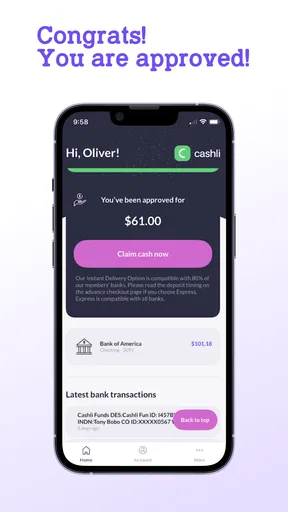
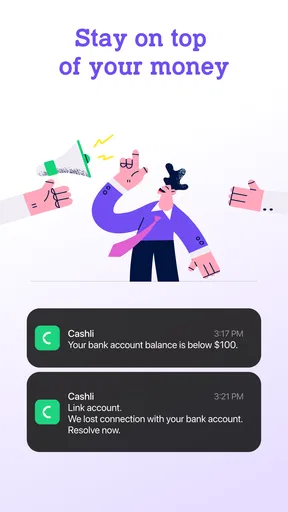
 Analysis by AppCompare
When I look at a finance app that offers quick access to money, I do not judge it by the promise alone. I want to know what the app lets me control, which decisions it asks me to make, and whether the experience encourages careful borrowing rather than rushed tapping. Cashli: Cash Advance & Rewards is built around that short-term-money use case, with a simple pitch: help users get up to 150 bucks when a financial worry cannot wait. In my experience reviewing this kind of app, the most important question is not whether the idea sounds convenient, but whether the user can understand the choices before committing.
Cashli is a free finance app from Cashli Funds. It is available for users aged Everyone, works on Android 8.0 and later, and its current version is 1.0.19. The app has passed the early-adoption stage, with more than one hundred thousand installs, an average rating of 4.1, and roughly five thousand ratings. Those figures suggest that many people are willing to try it, but they do not replace personal judgment. A quick-cash product can be useful in a narrow emergency while still being the wrong tool for regular money management.
What Cashli feels like when money is tight
The appeal is easy to understand. Imagine a routine payday is still several days away, your car needs fuel for work, and an unexpected bill has arrived. You do not necessarily need a full budgeting system or a long-term loan. You need to see whether a small advance is available and what accepting it would mean. That is the situation where Cashli makes the most sense to me: as a possible bridge for a specific, short-lived gap rather than as an everyday source of spending money.
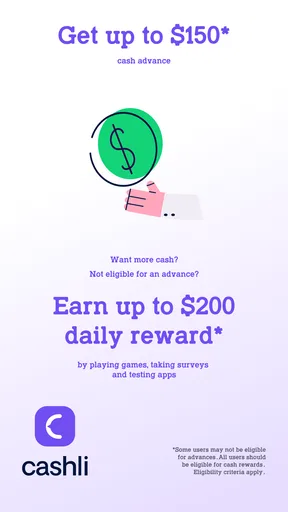
The phrase “up to 150 bucks” is important. It describes a ceiling, not a guaranteed amount for every user. I would approach the app expecting the available offer to depend on the application process and the information requested during setup. Before accepting anything, I would read every screen carefully, especially the amount, repayment timing, and any cost or condition shown in the final confirmation. A fast application is only helpful if the terms remain clear.
The rewards part also deserves a little restraint. Cashli combines cash-advance functionality with rewards, which may make the app feel more engaging than a plain borrowing tool. Still, I would not treat rewards as a reason to borrow. A reward should be an incidental benefit, not a discount that changes whether a cash advance is affordable. My rule would be simple: decide whether the advance itself fits the budget first, then consider any rewards separately.
Trust starts with the choices shown on screen
For a finance app, trust is built through visible decisions. I want the application to make it obvious what I am applying for, what information is needed, and what happens after I continue. I also want a clear chance to stop before submitting. Cashli should be evaluated through those moments rather than through its friendly wording or its rating alone.
When I use an app like this, I would pause at each permission request instead of approving everything automatically. A permission should have a clear connection to the task I am trying to complete. If a request feels unrelated to checking eligibility, managing an account, or delivering a reward, I would decline it or leave the process until I understand why it appears. That habit is useful with any finance service, but it matters even more when the product involves personal and financial information.
Worth Reading Before You Choose

EA SPORTS FC Mobile 26 Is a Bigger Football Game, but It Takes Time

Flipboard Shows What News Apps Must Do Beyond the Feed

Switching to Android Auto Means Rethinking Your Driving Routine

Google Calendar Makes a Crowded Week Easier to Manage

Ludo King Makes the Most of the Minutes Between Plans

Baby Panda World Brings Quick Play to Modern Phones, but Its Game Library Feels Busy
I would also keep an eye on account controls. The practical questions are whether I can review my application status, see an active advance, update basic details, and find a way to manage or close the account. These are not decorative features. They determine whether I remain in control after the initial application. If a screen makes it easy to proceed but difficult to review or change a decision, I would consider that a meaningful drawback.
How I would check the app before submitting
My first pass would be deliberately slow. I would install Cashli only from the official app marketplace, confirm that the developer name is Cashli Funds, and check that the app version shown on my device is current. I would then read the opening screens without entering information immediately. This gives me a chance to understand the flow and notice whether the app explains its purpose in plain language.
Next, I would prepare the details the app requests and keep my financial information consistent. Rushing through forms increases the chance of mistakes, and an incorrect detail can create avoidable friction later. I would take screenshots or notes of important confirmation screens for my own records, provided doing so does not expose sensitive information. This is especially useful if the app displays a repayment date, account instruction, or offer that I may need to check again.
Before confirming, I would look for the total amount involved, any stated fee, the timing of repayment, and the consequences of missing that timing. I would not rely on a headline amount or a rewards message to answer those questions. If the final screen is unclear, I would stop rather than assume. The safest feature in a cash-advance app is a user who refuses to confirm terms they do not understand.
Data-sensitive moments deserve extra attention
Cashli operates in a sensitive category because a user may share identity, contact, employment, income, or banking-related information during the process. I would treat every field as a separate decision, not as a harmless formality. If the app requests access to something on the phone, I would read the permission wording and consider whether manual entry or a later choice is available.
I would avoid using the app on public Wi-Fi, especially when entering financial details. I would also use a strong device passcode and keep the operating system updated. These steps are not unique to Cashli, but they reduce unnecessary exposure around any finance application. After finishing, I would review the app’s permissions in Android settings and remove access that no longer appears necessary, while remembering that changing a permission can affect how the app works.
Another careful moment comes when notifications arrive. Notifications can be useful for reminders, but they may also reveal sensitive information on a lock screen. I would check whether Android lets me hide notification content for Cashli or turn notifications off entirely if they become intrusive. A useful finance reminder should not expose an advance amount or account detail to someone who happens to see my phone.
I would also separate the app from my wider digital life. I would not reuse an important password, and I would avoid sharing verification codes with anyone who contacts me outside the normal app flow. If a message asks me to pay through an unusual route, send a code, or provide information that the app did not request during the normal process, I would stop and verify the request through the app’s own support path.
Where the app can help, and where it should stay out
Cashli may suit someone facing a small, temporary shortfall who already knows exactly how the repayment will fit into the next budget. For example, if a necessary expense arrives just before income and the user has a confirmed plan for covering the advance, a limited cash option may be more practical than delaying the expense. Even then, I would compare the final terms with the cost of other available choices before accepting.
It is less suitable for recurring bills, rent, groceries that are short every month, or a pattern of using one advance to cover another. Those situations point to a longer-term budget problem, and a quick-cash app cannot solve the underlying gap. In that case, I would prefer speaking with a bank, credit union, nonprofit financial counselor, or the bill provider about a payment arrangement. A slower option may be healthier than repeating short-term borrowing.
I would also skip Cashli if I could not clearly identify my repayment source. The maximum amount is small compared with many traditional loans, but “small” does not mean harmless. A repayment that lands at the wrong time can create another shortage, particularly when the budget is already tight. The app is best viewed as a possible emergency bridge, not as extra income.
Cashli compared with ordinary alternatives
Compared with a traditional bank or credit union, a cash-advance app can feel more direct and less formal. That convenience may help when the need is urgent, but a bank account or credit union relationship may offer clearer ongoing support, broader financial tools, or a better setting for discussing a recurring problem. The right comparison is not simply “which app is faster?” It is “which option leaves me in the strongest position after the money is received?”
Compared with a credit card, Cashli may appeal to someone who does not want another revolving balance. On the other hand, a credit card can provide a visible statement and an established repayment structure, depending on the account. I would compare the actual cost and due dates rather than assuming either product is automatically cheaper. A rewards feature should not distract from that comparison.
Compared with overdraft protection, the main difference is timing and account behavior. Overdraft coverage may prevent a payment from bouncing, while a cash advance may provide money before the payment is made. Each can carry conditions, and the better choice depends on the payment, the account, and the consequences of failure. I would check both options before using either one.
Compared with borrowing from a trusted person, Cashli may feel more private and structured, but personal borrowing can sometimes avoid formal app processing. That option has its own relationship risks, of course. My point is that Cashli should be one choice in a short list, not the automatic answer whenever money feels tight.
Small habits that make the experience safer
One useful habit is to calculate the repayment in the budget before applying. I would write down the expected income date, the essential bills due before then, and the amount that would remain afterward. If the advance would leave no room for food, transport, or another unavoidable expense, I would not proceed. This quick calculation is more valuable than focusing on the maximum available amount.
A second habit is to keep the application separate from impulse spending. I would decide the exact bill or need the money is meant to cover before opening Cashli. If I cannot name that purpose, I probably do not need to apply. This also makes it easier to judge whether the advance solved a genuine short-term problem or merely postponed a purchase.
A third is to review the account after the transaction rather than deleting the app immediately. I would check for confirmation details, repayment information, and any account messages. Once I had saved what I needed, I would revisit permissions and notification settings. Deleting an app without understanding the account status could make it harder to find important information later.
Finally, I would be cautious with rewards. I would read the conditions displayed in the app, note whether an action is optional, and avoid completing extra steps simply because they are presented as a bonus. Rewards can be pleasant, but they should never pressure me into sharing more information or taking an advance I did not already need.
Who should try it and who should pass
I can see Cashli being useful for an Android user who wants to explore a small emergency-cash option and is comfortable reviewing financial terms carefully. The free price removes an upfront download cost, and the Everyone age rating makes the app broadly accessible. Its strongest audience is someone with a defined short-term need, a reliable repayment plan, and enough patience to inspect each choice before confirming.
I would recommend passing if you are looking for a full budgeting platform, investment guidance, debt counseling, or a replacement for a normal bank account. Cashli’s central appeal is immediate access to a limited advance, not comprehensive financial planning. Someone who needs help controlling monthly spending would likely get more value from a dedicated budget tool or a human adviser.
I would also pass if the app asks for information or access that I cannot comfortably justify, or if the terms are difficult to understand. No quick solution is worth surrendering control over sensitive details. A clear “not now” is a better outcome than accepting something under pressure.
My cautious verdict
Cashli: Cash Advance & Rewards is a focused finance app with a clear emergency-use case. Its free availability, current Android support, and growing user base make it easy to consider, but those points do not answer the most important personal question: can I repay the advance without creating a new problem? In my view, that question should come before the application, the rewards, and the advertised maximum.
I would use it only for a specific, temporary need and only after checking the amount, timing, costs, permissions, notifications, and account controls shown during the process. I would keep my expectations modest because “up to” is not a promise of a particular offer, and I would compare the app with a bank, credit union, overdraft option, credit card, or payment arrangement before deciding.
My recommendation is cautious rather than enthusiastic: Cashli may be worth examining when a small emergency cannot wait, but it is not a substitute for stable income, a monthly budget, or long-term debt help. If the app gives you understandable terms and you already know how the repayment fits your finances, it can be a practical option to investigate. If the situation is recurring or the choices feel unclear, I would choose a slower, more transparent alternative instead.
Pros
- Fast application process with clear eligibility requirements.
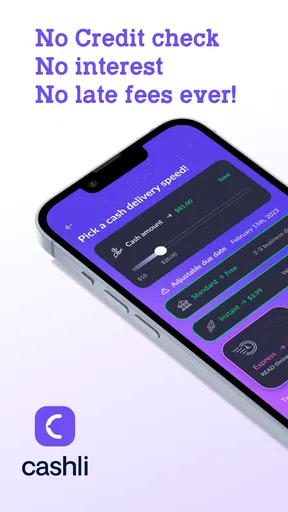
- No traditional credit check may help users with limited credit history.
- Rewards can provide extra value beyond the cash advance feature.
- Repayment dates and amounts are displayed clearly in the app.
- Useful budgeting tools help users monitor upcoming cash flow.
Cons
- Advance limits may be low for larger emergency expenses.
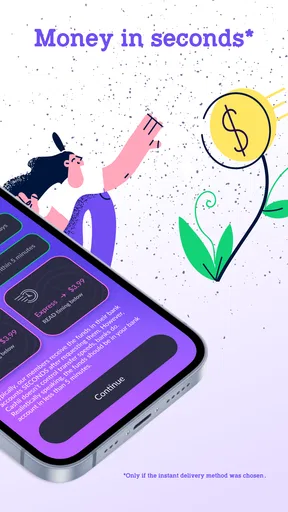
- Express funding or other services may include additional fees.
- Repayment is typically tied to your next paycheck.
- Eligibility and available features can vary by state or user.
- Cash advances can encourage repeated borrowing between paychecks.
FAQs for Cashli: Cash Advance & Rewards
What is Cashli: Cash Advance & Rewards, and how does it work?
Cashli: Cash Advance & Rewards is a financial app that may help eligible users access a small cash advance and earn rewards through selected activities. After creating an account, you generally provide personal and financial information, review the available offer, and complete any required verification. Approval, advance amounts, fees, repayment terms, and reward availability can vary by user, location, and eligibility.
Is Cashli: Cash Advance & Rewards a legitimate loan or payday loan service?
Cashli should not automatically be treated as a traditional bank, lender, or guaranteed payday-loan provider. Depending on your location and profile, the app may connect users with financial services or present an advance option through third-party partners. Before accepting anything, carefully read the provider’s name, annual percentage rate, fees, repayment schedule, privacy policy, and authorization details. Never accept an offer you do not fully understand.
How much money can I receive, and how quickly is it deposited?
The amount and delivery speed are not necessarily the same for every Cashli user. They may depend on identity checks, income information, account history, state availability, banking connections, and the partner responsible for funding the advance. Some transfers may arrive quickly, while others can take longer because of bank processing, weekends, holidays, or additional verification. The app should display the exact terms before confirmation.
Does Cashli charge fees, interest, or require repayment?
A cash advance is not free money and normally must be repaid according to the terms shown before you accept it. Depending on the offer, costs may include membership charges, service fees, expedited-transfer fees, or charges from a lending partner. Rewards may also have separate conditions or expiration rules. Review the total repayment amount, due date, recurring subscription terms, and cancellation process carefully before proceeding.
Is Cashli safe to use, and what personal information does it request?
Cashli may request information such as your name, contact details, identification data, income information, banking details, or permission to connect financial accounts. Use the official Google Play or App Store listing, verify the developer, and read the privacy policy before registering. Avoid sharing login credentials outside the app, enable device security, and understand how your data may be stored or shared with service providers and financial partners.


